
 Tiếng Việt
Discover how VTEK Vietnam leverages Tekla Open API to develop drawing automation tools, shorten project delivery time, and reduce errors in steel structure projects.
Background
VTEK Vietnam delivers steel fabrication drawings for a wide range of projects, including Japanese projects that require strict compliance with drawing presentation standards. In addition to accuracy, drawings must also maintain consistency between Assembly Drawings and GA Drawings, enabling reviewers to cross-check and verify information directly on the 2D drawings.
During project execution, VTEK’s engineering team identified several repetitive daily tasks for which Tekla Structures did not provide corresponding built-in functions. When performed manually, these tasks could take a significant amount of time, particularly on projects involving large numbers of components and drawings.
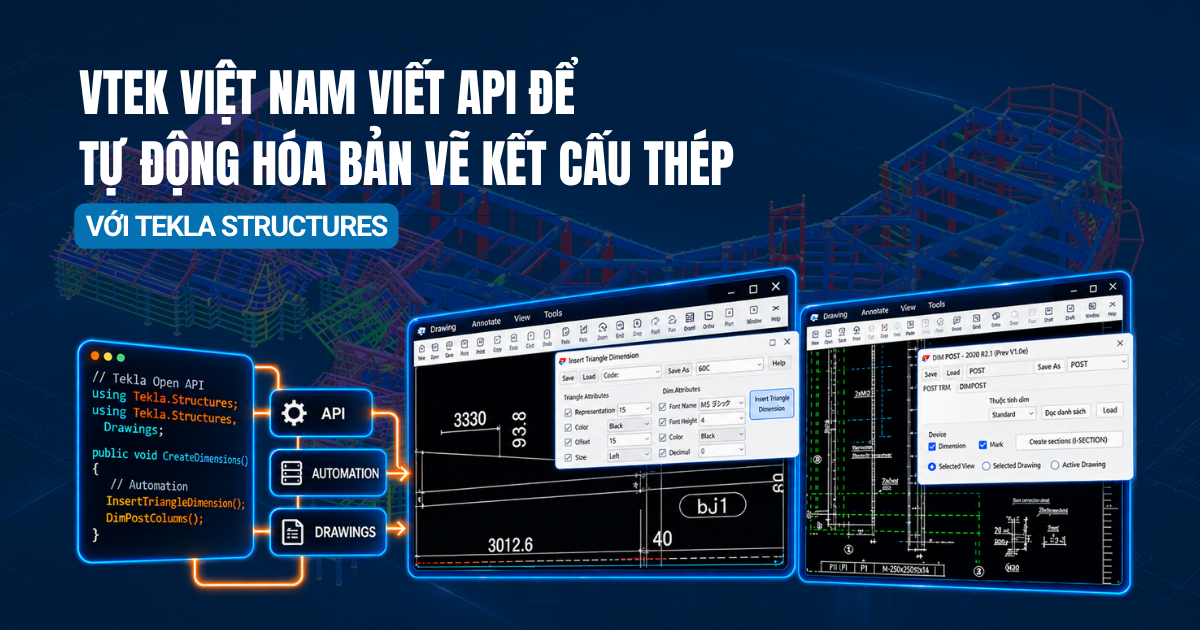
With Tekla Open API, VTEK is able to proactively develop its own tools tailored to the company’s workflows and drawing standards. The two tools below are representative examples of how Open API can be applied to automate practical engineering tasks.
Tool 1: Creating Slope Triangles for Inclined Beams
Challenge
For inclined beams, drawings need to display slope triangles, for example, 3330 / 93.8. However, Tekla’s built-in functionality does not support displaying decimal values in these triangles.
As a result, engineers previously had to carry out several manual steps for each beam:
- Expand the view for better visibility.
- Measure the work points at both ends of the beam.
- Calculate the required values.
- Manually enter the values into the Tekla slope triangle.
When a drawing contains dozens or even hundreds of inclined beams, the amount of repetitive work becomes substantial. Manual measurement, calculation, and data entry also increase the risk of errors.
Solution
VTEK developed the Insert Triangle Dimension tool to automatically retrieve coordinates and calculate slope triangle values, while also allowing decimal values to be displayed, for example, 3012.6 / 93.8.
The tool provides a range of customization options to meet the presentation standards of different projects:
- Adjust the hypotenuse length, offset, and triangle placement side.
- Configure font, text height, color, and number of decimal places.
- Insert triangles by individual beam, by assembly, or by selecting points.
- Quickly remove previously created triangles.
- Save and load configurations, such as the “GOC” preset, allowing the entire team to work with a consistent standard.
As a result, the steps of expanding views, measuring work points, performing calculations, and manually entering values can be significantly reduced.
“This slope triangle tool is very valuable to us. Doing it manually takes quite a lot of time—we have to expand the view, measure the work points at both ends, obtain the values, and then enter them into Tekla’s triangle. The tool has helped us save a significant amount of time.”
— Mr. Nguyen Thanh Hieu, Director of VTEK Vietnam
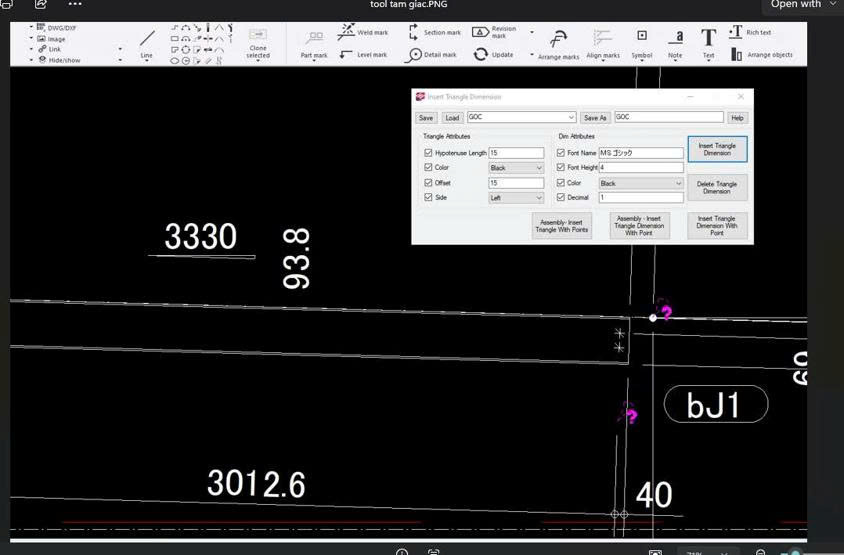
Figure 1. Insert Triangle Dimension tool – slope triangle displaying decimal values (3012.6 / 93.8)
Tool 2: Automating Dimensioning and Section Creation for Posts in Japanese Projects
Challenge
For post drawings in Japanese projects, VTEK needs to create dimensions based on elevations and grid lines, while also showing detailed sections such as A断面, B断面, C断面, and others.
When a project involves a large number of posts, manually creating dimensions and sections for each drawing can require many hours of work. In addition, existing dimensions and marks may overlap with newly created elements if they are not properly handled, affecting the clarity and presentation of the drawings.
Solution
VTEK developed the DIM POST tool to automate multiple tasks involved in producing post drawings:
- Create dim: Automatically creates dimensions for posts based on elevations such as 1FL, as well as grid dimensions through the DIM GRID tab.
- Create sections (+SECTION): Automatically creates the required section views.
- Automatically removes existing dimensions and marks before creating new ones, helping keep drawings clean and minimize overlapping elements.
- Allows users to select the scope of application, including the selected view, multiple drawings at once, or the currently opened drawing.
- Saves configurations for individual projects, such as the “POST” preset.
In one practical case, with just a single click, the tool created 8 dimensions and removed 41 existing dimensions/marks within one view, significantly reducing the number of manual operations required.
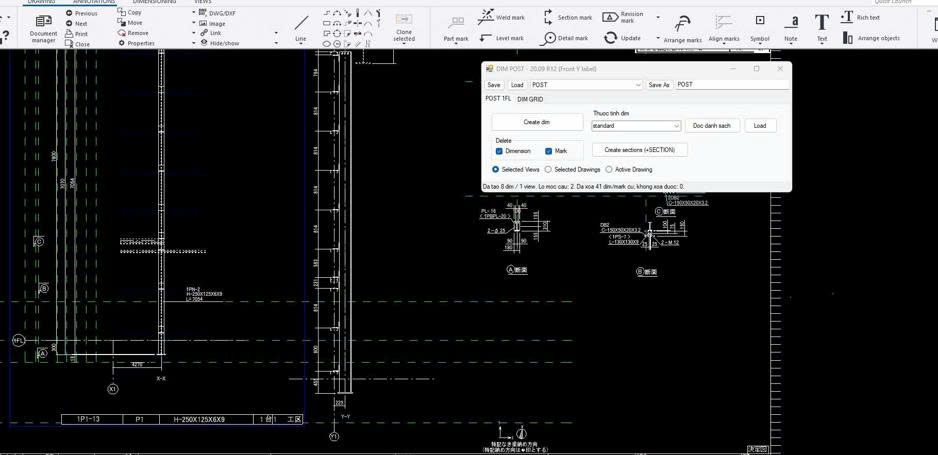
Figure 2. DIM POST tool – automated dimensioning and section creation for posts in Japanese projects
Results
By applying Tekla Open API, VTEK Vietnam has been able to automate repetitive tasks and address project-specific requirements in the steel detailing process.
Key outcomes include:
- Significantly reducing the time required to produce Post drawings, particularly for projects involving a large number of columns.
- For Posts located far from the X or Y grid lines, displaying the actual distance from the Post centerline to the grid can make the drawing difficult to present clearly. The tool can automatically create reference grid lines with accurate values, helping make drawings easier to review and better aligned with drawing presentation requirements.
- Reducing errors caused by manual measurement, calculation, and data entry.
- Standardizing drawing presentation across engineers through the ability to save and load configurations.
- Allowing engineers to spend more time on technical review instead of repetitive manual operations.
Through Tekla Open API, VTEK Vietnam has proactively extended the capabilities of Tekla Structures with tools developed around the company’s actual workflow requirements. From automatically creating slope triangles for inclined beams to automating dimensions, section creation, and grid handling for Posts, these tools help make the drawing production process faster, more consistent, and better suited to the requirements of each project.
Konia Software Solutions
